KaraKEYoke Karaoke 2.7.5
Updated on 08 Jul 2011
By Anthony Buckner
By Anthony Buckner
Specifications
License:
Shareware (Free to try)
Updated:
Downloads:
297
Platform:
Windows All
Publisher:
R2R Group(more)
Website:
Unknown
User Reviews:
Other versions:
Do you like
KaraKEYoke Karaoke?
KaraKEYoke Karaoke?
Publisher's Descriptions
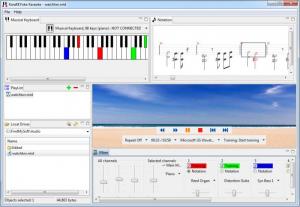
Using this karaoke player you can sing your favorite songs and also easy to learn to play the Piano, Musical Keyboard, MIDI keyboard. Even if you don't know the right notes!
KaraKEYoke can load any standard MIDI or karaoke songs for the computer, .mid or .kar, that can be used for karaoke or learning to play the Piano. You can easy find such files in the Internet.
You can choose a fragment of a liked song and quickly teach yourself Piano. Several modes of training suit for any level, for children, beginners, and for those who don’t know notes and didn’t play Piano earlier. For training it is necessary to connect to the computer any Musical Keyboard, Digital piano or MIDI Keyboard.
Tutor KaraKEYoke will show you which keys it necessary to press and patiently to wait when you press them. If the Key Lighting Keyboard (Casio LK- digital keyboards) is connected to the computer then keys will be highlighted directly on Electronic Piano Keyboard, and training will be more interesting.
Sometimes for karaoke singing it is necessary to strengthen solo to get a good support for a voice. For this purpose MIDI and a karaoke player KaraKEYoke allows to choose the corresponding MIDI channel and to up loudness of this channel and to replace the Instrument with more expressive. It is in addition possible to transpose a key of all composition or to shift all notes on the chosen track/channel on an octave to the left or to the right.
Many Musical Keyboards and Digital Pianos Casio LK - CTK - WK-... allow loading into them special MIDI files with songs, for example using SD memory card. Such files are difficult for finding, because Digital Keyboards use special format SMF0. Now the converter is not necessary to you to convert MIDI and a karaoke files to SMF-0 format, because teaching piano software KaraKEYoke is able to play songs directly on Musical Keyboard, and supports set of options and training modes.
Probably learning piano software KaraKEYoke is a good gift for those who not only likes to sing a karaoke, but wishes to get additional pleasure from immersing in the music world, and can be further to begin serious studying at musical school or with the teacher, having plunged in solfeggio, arpeggio, accompaniment, notes, chords, transpositions, scales, upbeat, downbeat, the sizes, legato, a staccato, pauses, phrases, parties, score, intervals, major and minor keys.
You can find on the product website detailed step-by-step guide: How to learn to play the Piano, Electronic Musical Keyboard, MIDI Keyboard using KaraKEYoke.
KaraKEYoke can load any standard MIDI or karaoke songs for the computer, .mid or .kar, that can be used for karaoke or learning to play the Piano. You can easy find such files in the Internet.
You can choose a fragment of a liked song and quickly teach yourself Piano. Several modes of training suit for any level, for children, beginners, and for those who don’t know notes and didn’t play Piano earlier. For training it is necessary to connect to the computer any Musical Keyboard, Digital piano or MIDI Keyboard.
Tutor KaraKEYoke will show you which keys it necessary to press and patiently to wait when you press them. If the Key Lighting Keyboard (Casio LK- digital keyboards) is connected to the computer then keys will be highlighted directly on Electronic Piano Keyboard, and training will be more interesting.
Sometimes for karaoke singing it is necessary to strengthen solo to get a good support for a voice. For this purpose MIDI and a karaoke player KaraKEYoke allows to choose the corresponding MIDI channel and to up loudness of this channel and to replace the Instrument with more expressive. It is in addition possible to transpose a key of all composition or to shift all notes on the chosen track/channel on an octave to the left or to the right.
Many Musical Keyboards and Digital Pianos Casio LK - CTK - WK-... allow loading into them special MIDI files with songs, for example using SD memory card. Such files are difficult for finding, because Digital Keyboards use special format SMF0. Now the converter is not necessary to you to convert MIDI and a karaoke files to SMF-0 format, because teaching piano software KaraKEYoke is able to play songs directly on Musical Keyboard, and supports set of options and training modes.
Probably learning piano software KaraKEYoke is a good gift for those who not only likes to sing a karaoke, but wishes to get additional pleasure from immersing in the music world, and can be further to begin serious studying at musical school or with the teacher, having plunged in solfeggio, arpeggio, accompaniment, notes, chords, transpositions, scales, upbeat, downbeat, the sizes, legato, a staccato, pauses, phrases, parties, score, intervals, major and minor keys.
You can find on the product website detailed step-by-step guide: How to learn to play the Piano, Electronic Musical Keyboard, MIDI Keyboard using KaraKEYoke.
Do you like KaraKEYoke Karaoke
KaraKEYoke Karaoke Disclamer
Please be aware FindMySoft.com accepts no responsibility for the file you are downloading. The same applies to the information provided about the software products listed.
We do not allow the inclusion of any KaraKEYoke Karaoke serial, keygen or crack and we disclaim any liability for the inappropriate use of KaraKEYoke Karaoke.
FindMySoft advises that KaraKEYoke Karaoke should be only used in accordance with the rules of intellectual property and the existing Criminal Code.
For your own protection ALWAYS check downloaded files for viruses.
We do not allow the inclusion of any KaraKEYoke Karaoke serial, keygen or crack and we disclaim any liability for the inappropriate use of KaraKEYoke Karaoke.
FindMySoft advises that KaraKEYoke Karaoke should be only used in accordance with the rules of intellectual property and the existing Criminal Code.
For your own protection ALWAYS check downloaded files for viruses.
Advertising
Popular News
The free AboutOne app is currently exclusive to Windows Phone. The app is available for free in the Markeplace.
Google rolled out Chrome 19 to the Stable Channel. This version fixes some security problems and adds tab syncing capabilities.
Your Rating
2.6
out
of
5
of
5
Rated By
7 Users
7 Users
Top Downloads
2.
Opera5.
Trillian8.
AIM9.
Skype10.
Ad-Aware12.
Nero13.
Google Earth14.
Picasa15.
Winamp16.
iTunes17.
RealPlayer18.
uTorrent19.
eMule20.
WinRAR21.
BitComet22.
WinZip23.
Shareaza24.
CCleaner25.
Recuva26.
Tweak UI27.
CuteFTP Home29.
Adobe Reader30.
NewsPiperBecome A Fan!
Link To Us!
KaraKEYoke Karaoke
HTML Linking Code
HTML Linking Code
Latest Reviews